The Run Dialog
The Run Dialog brings together a registered file and a group of csvpath statements in a run. Runs are how validation and upgrading happen. The Dialog can take a plain named-file name and named-paths group name, or, to select more specific inputs, you can give references that indicate specific data versions or csvpaths.
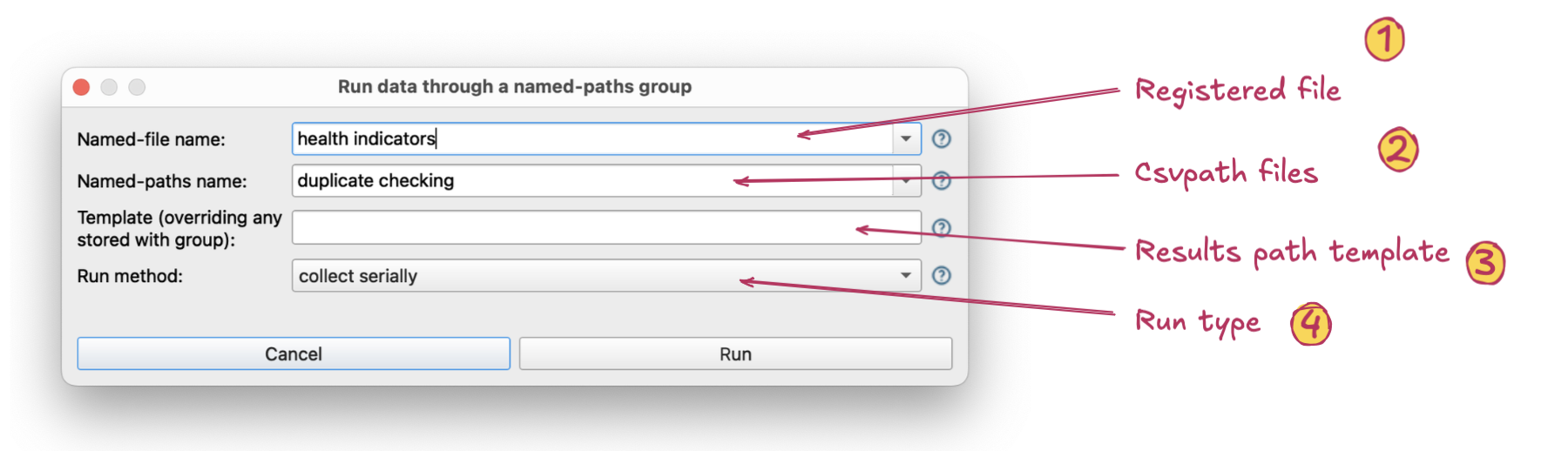
The find data dialog helps you find registered files and run results
- Registered file name. The named-file name or a more specific dynamic reference picking out one or more registered files within a named-file. If the plain named-file name is used the last file registered will be run.
- Csvpath scripts name. The named-paths group name or a more specific reference to one or more csvpath statements in the named-paths group. If a reference is provided, only those csvpaths specifically indicated are used in the run.
- Results path template. This is the same capability to define a dynamic location for the results within the abstract named-paths group name the live under. If a template was added to the named-paths group definition this field would override it. A dynamic template can position results in a way that makes them easy to browse or query using references, or to match a downstream consumer’s requirements.
- Type of run. There are four types of runs. Two are serial, where csvpaths in the named-paths group are run one after another. Two are breadth-first, where each line of data passes through every csvpath in the group before the next line is processed. These options are covered in more depth on csvpath.org.