The Server Form
Configuring and ussing FlightPath Server
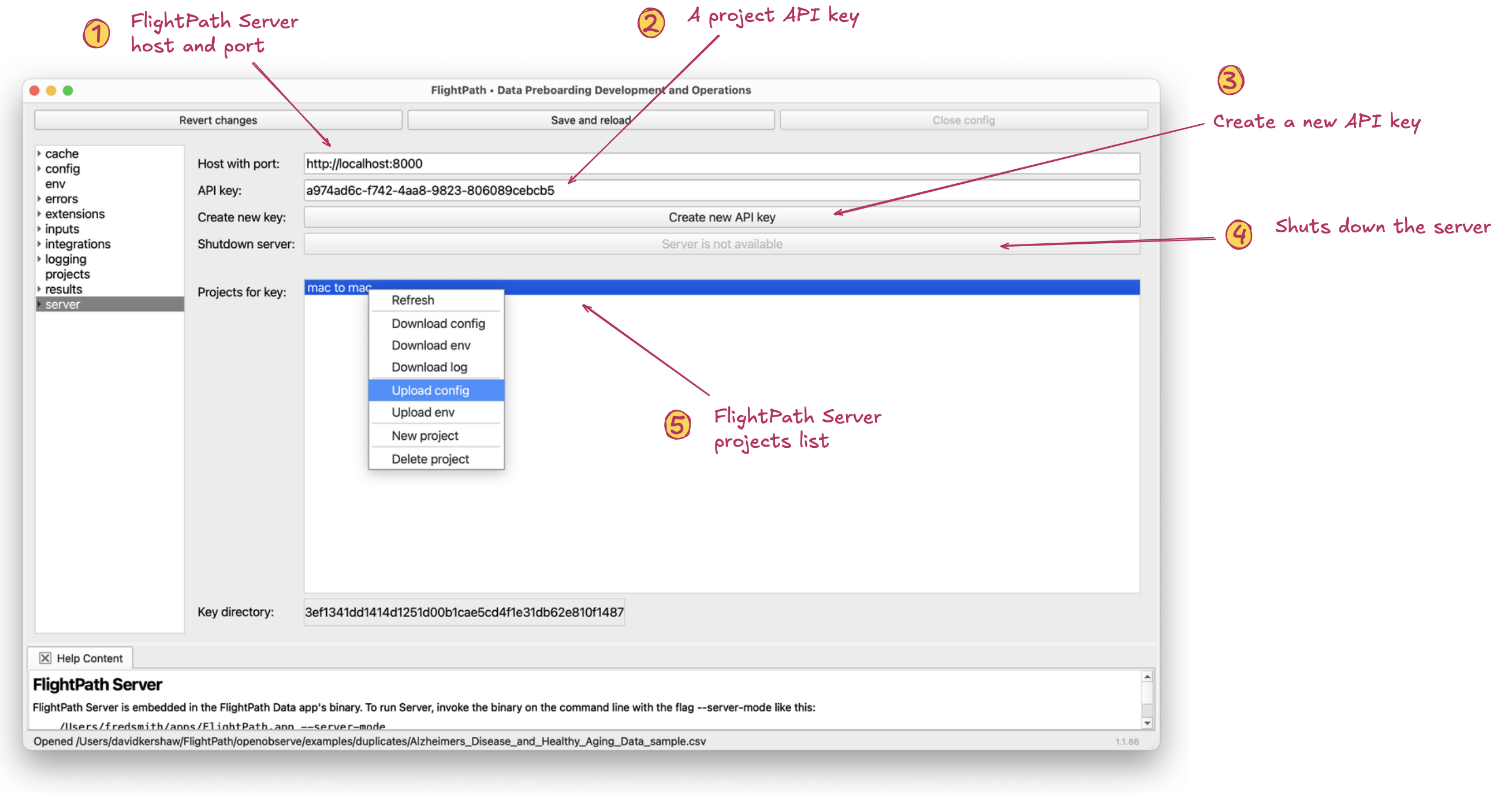
The server form
- Host with port. The location of the FlightPath Server you want to use with this project. Each FlightPath Data project can use a different FlightPath Server.
- API key. FlightPath Server requires each API request have an access_token header containing an API key. Keys are associated with projects, not users. Any user can create a new project associate with a key they hold. As is obvious, FlightPath Server relies on parameter security for its protection. It only uses keys for information control between project teams.
- Create new API key. The first API key created is marked as an admin key a very small set of additional powers. Any user with a valid key can create a another API key that will control a different set of projects.
- Shutdown FlightPath Server. When a FlightPath Server is available, and the API Key is an admin key, this button allows you to shut the server down. Shutdown is immediate.
- Server projects list. This list shows all the projects available to the given key. Right-clicking on a project name brings up a context menu with:
- Refresh: reacquires the projects list. If another user has changed the projects of the given key the list will update. Download config: downloads the config.ini of the project. You will be prompted to open the locally saved file. You will not see the file in your project, typically, because `.ini` is not usually in your extensions list, and is not one of the default visible extensions, .md, .json, .txt, and .html. You can open the downloaded server project config file by opening the project directory in Finder or File Explorer. Download env: similar to the config download, but for the variable substitution file. Download log: after you do at least one run you can download the log file anytime. Upload config: uploading config means sending the current FlightPath Data project's config to be the FlightPath Server config. There are a few fields, primarily local file system paths, that are not settable by uploading the local config to the server. These are reserved in order to fully separate server projects from one another. Upload env: opens a form providing a click-to-add means of creating an env.json from the OS env vars available locally to this FlightPath Data project. The env.json file is uploaded to the server to stand in for OS env vars for the sole use of that server project. Create new project: Creates a new project associated with the current API key. Any holder of a valid API key can create a new project. Delete project: prompts to confirm before irrecoverably deleting the server project.