Investigating Data Problems
Using FlightPath Data and Server to find out what happened
Preboarding exists to minimize friction as data comes in the organization. However, data problems inevitably happen. When bad data is found long after it entered you have to trace the data back until you find the source of the problem so the process can be fixed or made more fault tolerant. This investigation requires:
- Data identification
- Immutable data captured at key stages
- Process and processing stage identification
- Immutable, idempotent, and available logical and/or declarative operations on the data
These attributes allow you to discover and rewind the data’s:
- Chain of custody - the record of access and handling of the data set
- Lineage - change in the identified data set’s content set over time across systems
- Provenance - the source, trust, and validity of the data content
Understanding these aspects of the data under investigation require a ton of metadata from the systems involved. CsvPath Framework and FlightPath Server are just the first step in the data journey from entry to production. However, they set the foundation supporting the metadata collection of later stages in the data lifecycle.
Moreover, many times data problems can be traced back to an external party. Without solid evidence, offering findings back to external parties can be come contentious. With trustworthy metadata from the preboarding system, those conversations become more productive.
How to answer a few common questions
- How is my data identified?
- What was my source data at a point in time?
- Which processes ran, what were the results, and how were they identified?
How is my data identified?
In CsvPath Framework we identify data at registration time, and augment that identity as it carries forward through processing stages. By way of analogy, the identity CsvPath Framework gives an item of data is:
- A birthday
- A social security number (swap in your national ID # of choice)
- A hospital address and home street address
- A given and family name These are the attributes that identify us as people fully and authoritatively. At the time data starts its organizational lifecycle – it arrives – the same attributes can be made available. That is what we mean by registration.
By default, CsvPath Framework captures metadata to seven types of manifest files located in specific places in project directories. The Framework can also capture the same data to a local SQLite file and/or any mainstream relational database. The manifests are friction-free to setup, fast, and easy to use manually or by scripting. Local SQLite is similarly fast and easy and is better for querying. A central database is more amenable to DataOps at scale, querying for complex associations, and long-term and/or high volume metadata capture. The choice is yours.
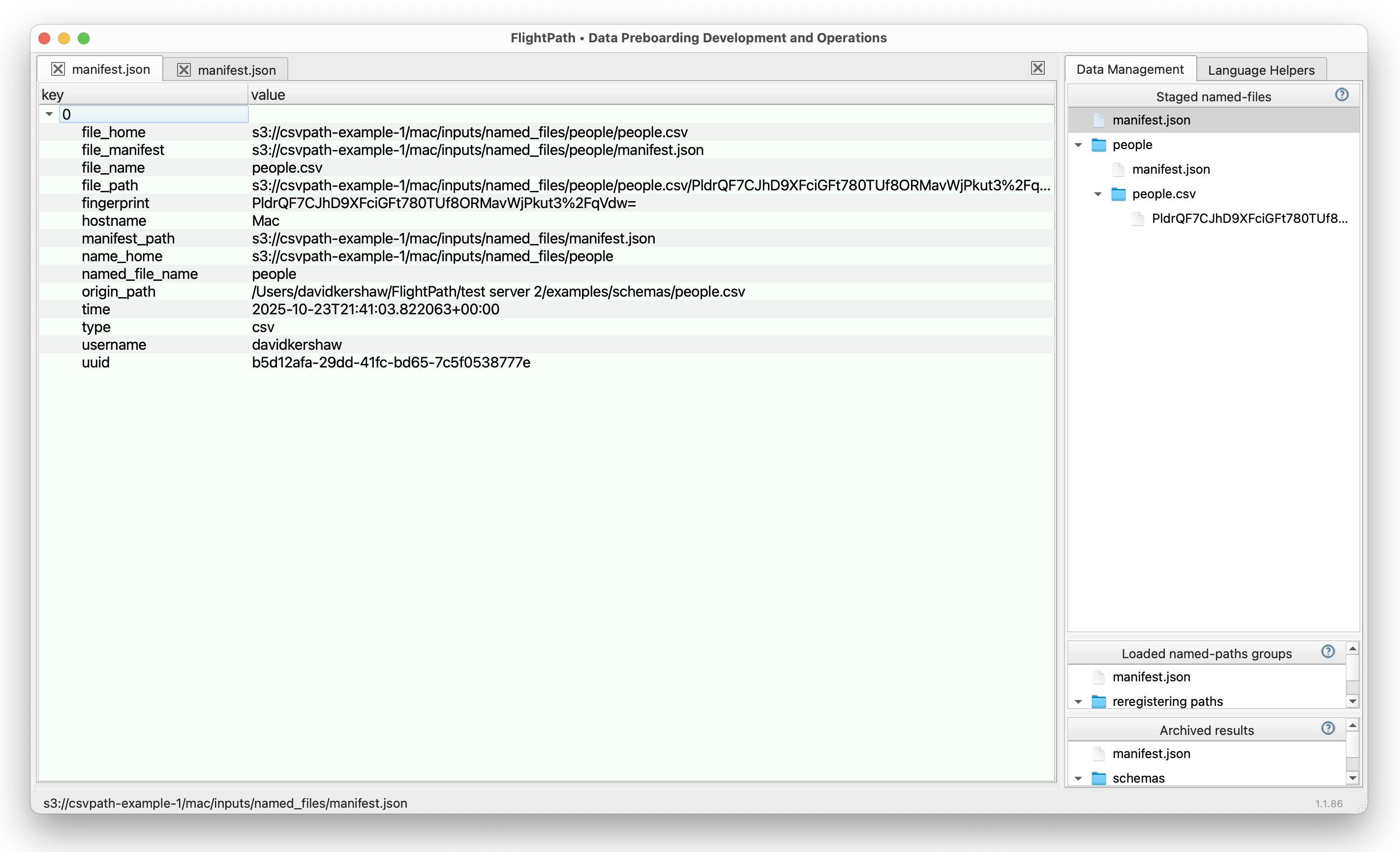
In the metadata you will see a ton of detail. The main registration events record is kept at the top of the named-files directory structure. Some of the ways to identify data it offers, matching the conceptual attributes in the bullets above, are:
| Birthday | Registration time: [named-files]/manifest.json: time |
| SSN | UUID: [named-files]/manifest.json: uuid SHA256 file fingerprint: [named-files]/manifest.json: fingerprint |
| Addresses | Source location: [named-files]/manifest.json: origin_path Home location: [named-files]/manifest.json: file_home Physical file bytes registered-to location: [named-files]/manifest.json: file_path Source location to registered location mapping: [named-files]/manifest.json: template |
| Names | Registration name: [named-files]/manifest.json: named_file_name Physical file name: [named-files]/manifest.json: file_name |
What was my source data at a point in time?
When a new physical file is registered as a named-file, it becomes the current version of that name.
For example, imagine a new invoices file arrives from Acme Inc. each month at path that is in the form /acme inc./
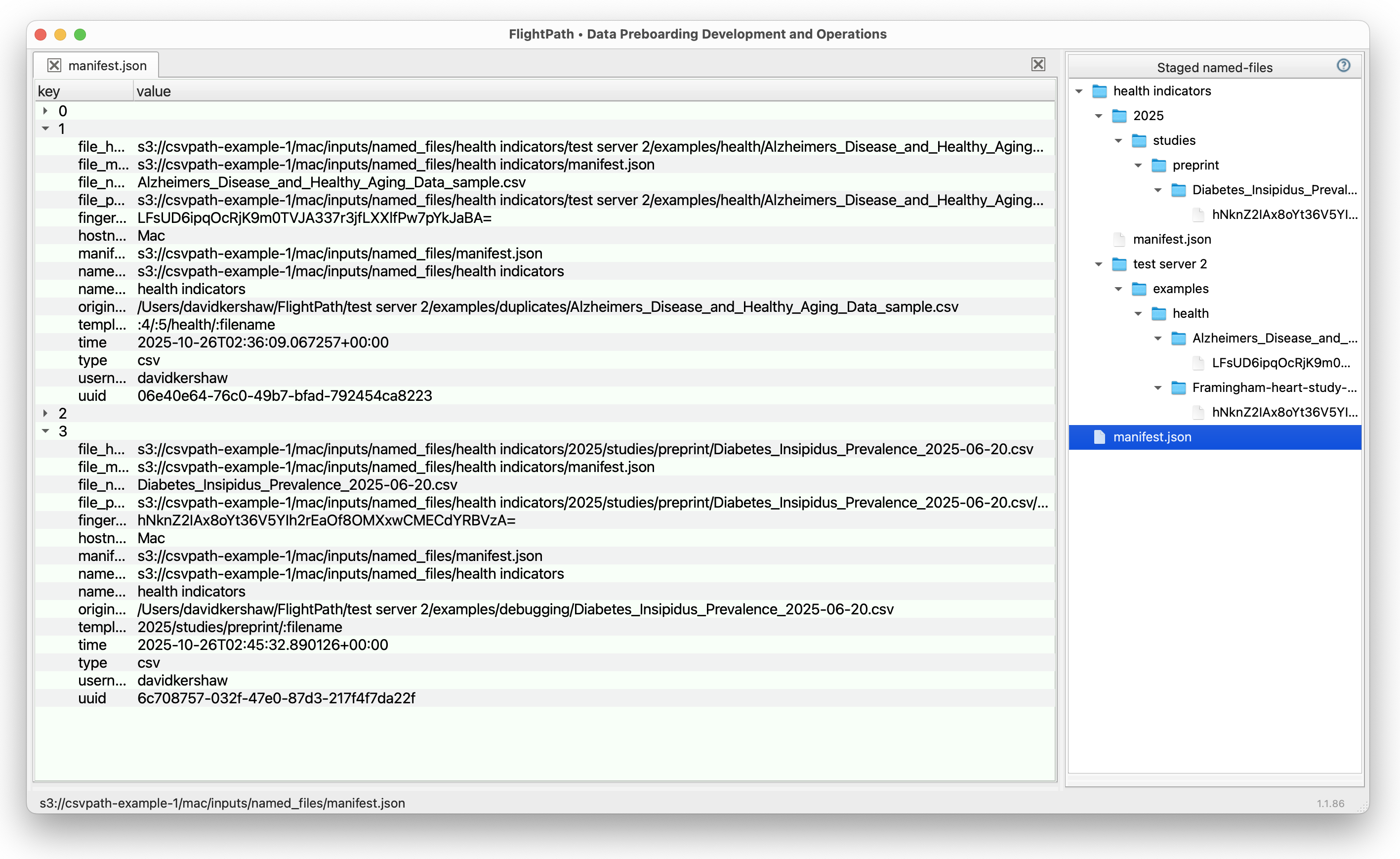
Now in April 2025 a new monthly invoices file comes from Acme Inc. It lands at /acme inc./2025/04/invoices/acme-invoices-april-2025.csv. In due time, we run the invoices named-file against the monthly invoice checks, same as we did for March. This time the monthly invoice checks is applied to the file registered as an invoices version that originally landed at /acme inc./2025/04/invoices/acme-invoices-april-2025.csv.
In setting up that workflow we can use templates to adjust the named-file storage paths and references to pick out different versions of files that may have distinctive names or date windows, etc. But that’s a whole different story. The question for a data problem triage effort is what was the source file that led to the problem and what was its exact content?
CsvPath Framework keeps every version of a named-file in an immutable store. You can always go back and see the exact bytes that were used in a run. And you can find that source from the run manifest by looking at:
named_file_name- the highest level identificationnamed_file_path- the fully qualified path to the bytesnamed_file_fingerprint- the SHA256 hash of the bytesnamed_file_uuid- a unique UUID generated when the named-file version was registered
These attributes tell slightly different stories, all of them useful.
The named-file name is crucial contextual information, but doesn’t identify the bytes run. The named-file path tells where the bytes were at the time of the run, this should never change. The fingerprint of the file is useful for checking for any uses of the same bytes in other contexts.
The UUID gives assurance of a specific identity that is durable through any operational quirks that might make a file be reregistered without being recognized as an existing version. This last should never happen, but data aging from warm to cold storage, data retention windows, compression and backups management, system or infrastructure failures, and more make it impossible to rule such confusion out.
Which processes ran, what were the results, and how were they identified?
A CsvPath Framework run is the application of the named-paths group validation and/or upgrading statements to a particular version of a named-file. How can we know what runs happened, where the results are, and what IDed assets were brought together in the run to generate results? These are good questions for the runs manifest.

The runs manifest lives at the top of a project’s results archive. It captures every csvpath statement that generated results in every run. If we know the named-paths group a run comes from it is easy to go to that name in the archive and see all the runs in timestamped directory names. However, because you can apply a template when you trigger a run that will store the run results at any arbitrary location under the results name, it may be quicker to look in the runs manifest. The manifest is a simple, linear activity list.
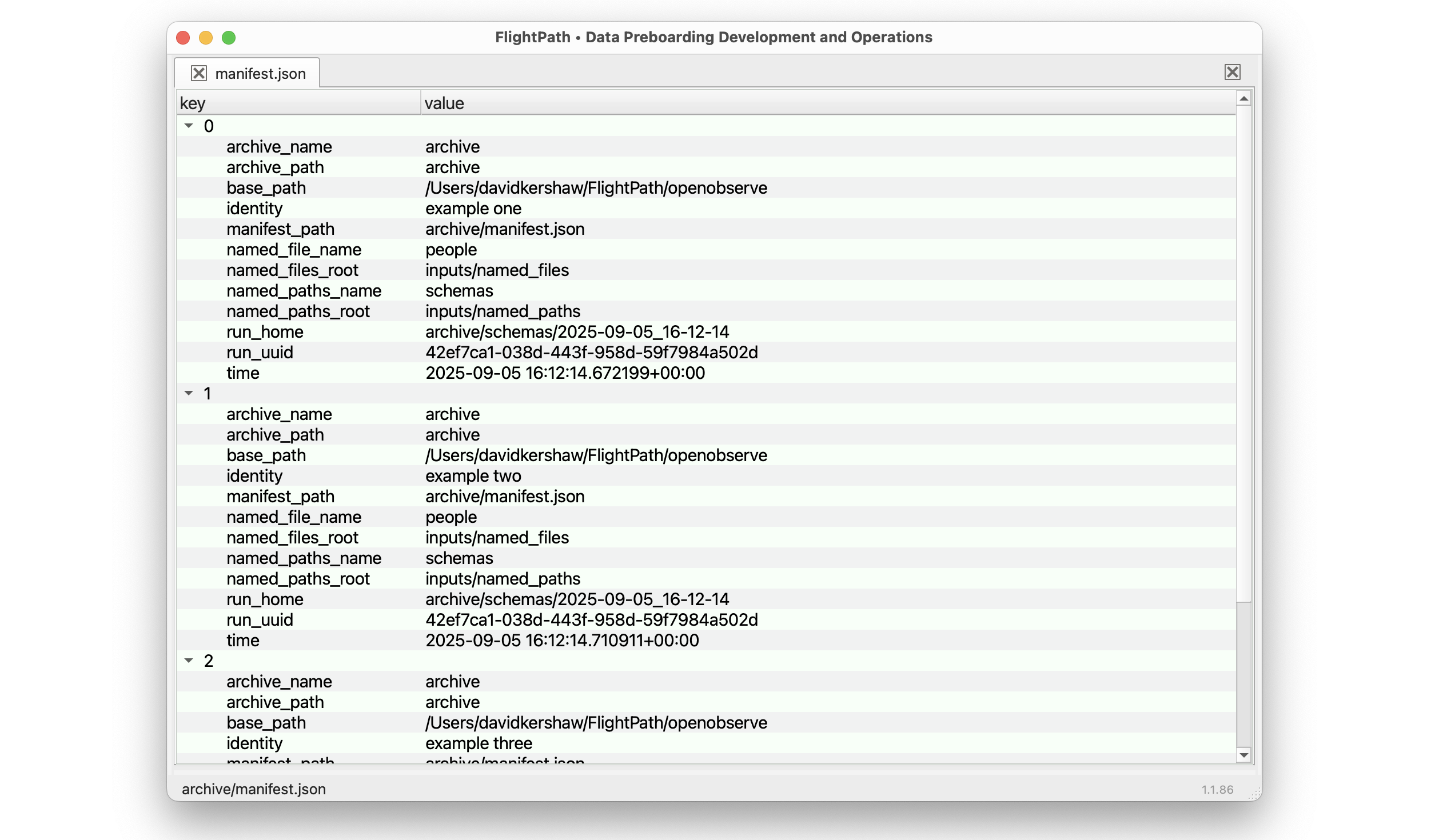
A run identity in a runs manifest record is made up of these parts:
- A timestamp-named run directory name
- The complete run home path within archive
- A UUID for the run
- The identity of the csvpath the record tracks
You may want to identify a run or runs by their parts. The named-file and named-paths group names are included in the run record.
When you have a run dir you have all the assets that were created in the run. That includes matching data files, metadata, errors, variables, and printouts. Each run has a manifest file that captures information about the run as a unit. The fields give more detailed information about the csvpaths and source data file, including fingerprints and UUIDs, so you can refer back to the metadata captured about those assets themselves. You also find success and completion indicators, such as validity, error counts, result files generated, etc.
And finally, one layer down in the archive, the run’s csvpath statements each have a set of one to seven metadata and result files:
- manifest.json
- data.csv - all matched lines
- unmatched.csv - all unmatched lines
- errors.json - validation errors, CsvPath Validation Language, and system errors
- variables.json - variables generated during the run by the csvpath
- metadata.json - the metadata fields, modes, and runtime indicators
- printouts.txt - any print statements in the csvpath
These files carry far more information that is critical to understanding what happened. They are the lowest and most impactful level of the lineage trace. The set of information in these files defines the known-good or known-bad data coming into the organization. If you have an OpenLineage or OpenTelemetry platform tracking your data assets, these files are tracked there as the preboarding state published to downstream.
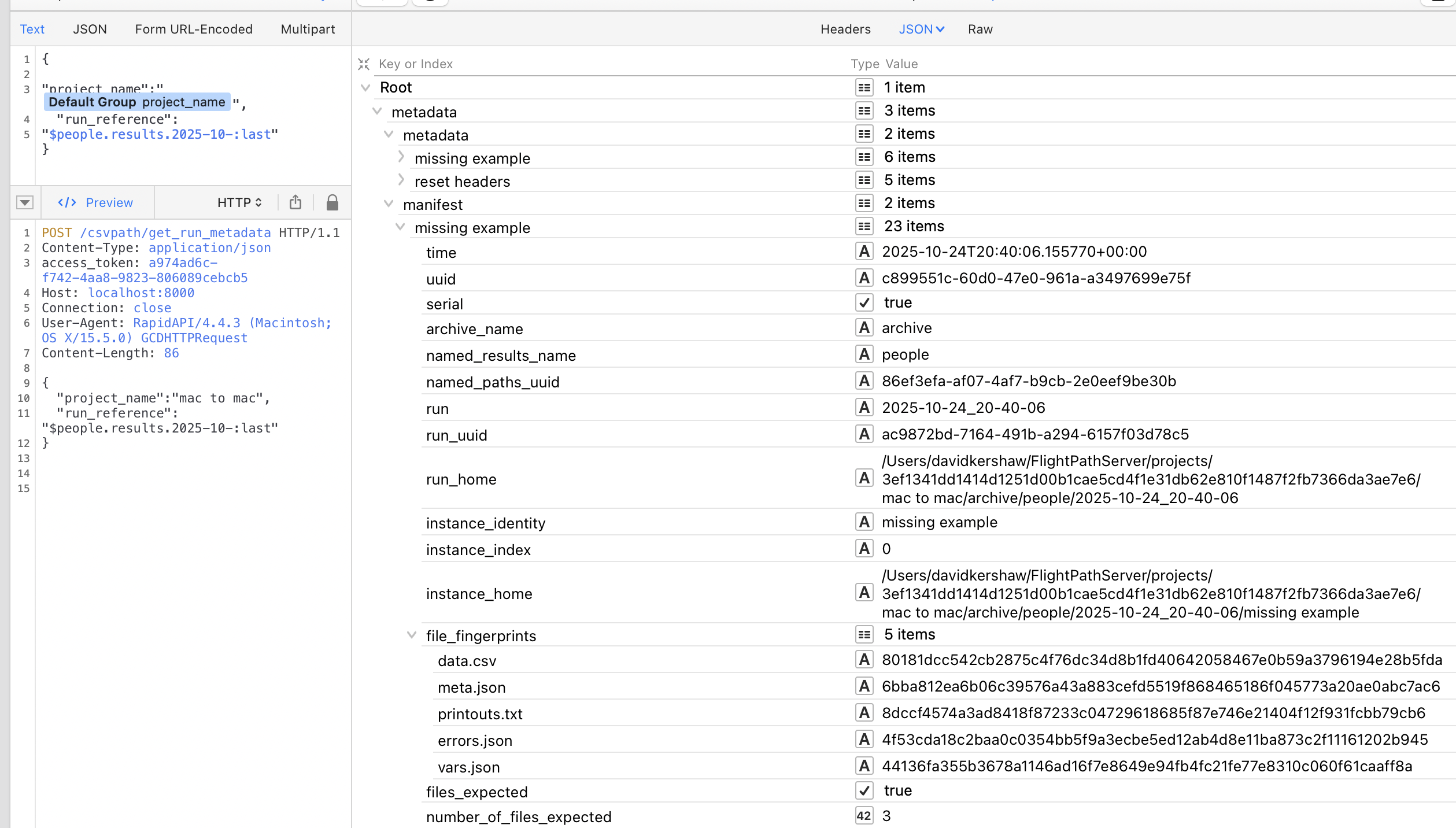
For the purposes of traceability, the identifiers in a csvpath’s manifest.json and it’s parent run’s manifest need to be captured by the ingesting data lake or app, AI, or analytics system, and carried with their own metadata. Ideally, the identifiers carried are the UUIDs. And, in reality, all that is needed is for the data consumer to track the csvpath manifest’s UUID. Everything we may someday need to know can be traced back from there.