The Csvpaths Group Load Dialog
The Load Dialog is how you assemble a group of csvpaths that can be run as a unit. It can load csvpaths by directory, from a file, or from a JSON description. You can append csvpaths to your group after first create it, if needed.
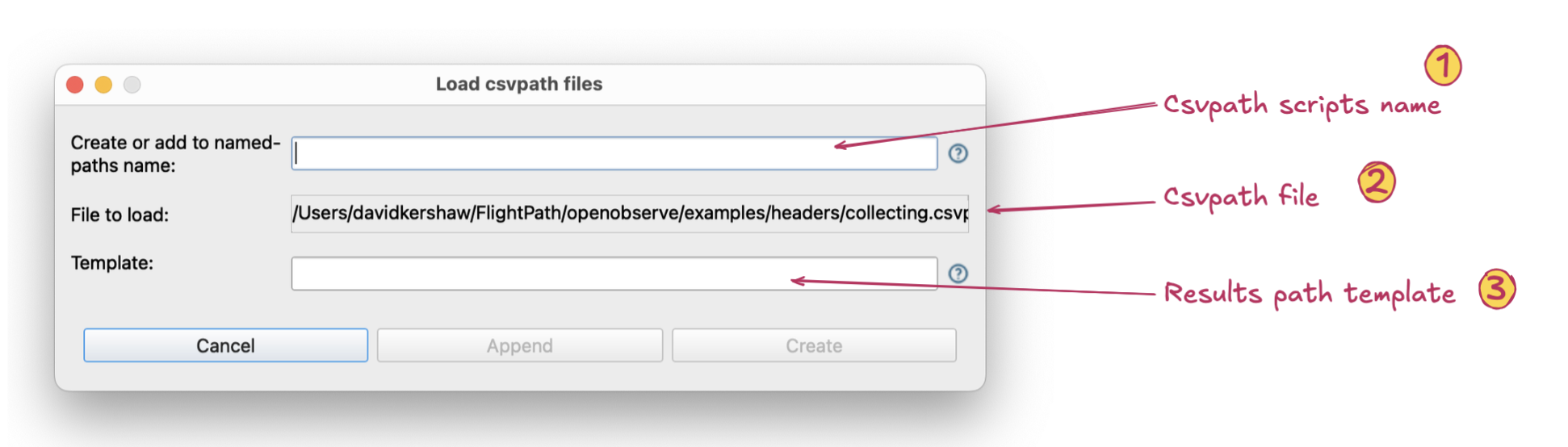
The Load Dialog is available when you right-click a csvpath file or a folder in the projects file tree on the left
- Csvpath scripts group name. A named-paths group is a group of csvpaths that validate and/or upgrade data files. Each group has a name and each csvpath within the group has its own name, sometimes called its identity.
- Csvpath scripts file or JSON pointers file. Named-paths group can be created from a file with one or more csvpaths or from a simple JSON dict,
definition.json, that maps a name to a list of csvpath files. When the csvpaths are added to the named-paths group they are bundled into onegroup.csvpathsfile. - Results path template. A template determines the location of a run’s home directory, sometimes called its run_dir. The template can have dynamic path segments, :1, :2, etc., that map to the location of the physical source data file’s original location. This way if a file arrives in a directory called
/data/acme inc/2025you can use2025in the results path dynamically.