
Generate Csvpath
How to generate one or more validation csvpaths based on example data and instructions
How To Generate Csvpaths
FlightPath Data can generate csvpath validation and/or upgrading statements based on sample data and any instructions. It is possible to provide a business context and/or business rules and receive back a working set of one or more statements.
In practice, while the validation FlightPath provides will execute correctly, it typically takes more engagement to create the ideal validation or upgrading for your use case. It is also possible that you may want to adjust the grain of the statements. In many cases, though not all, including only one rule per csvpath can simplify development and testing.
How to do it
- Open FlightPath and check that your AI config is correct like this.
- Open
examples/duplicates/Alzheimers_Disease_and_Healthy_Aging_Data_sample.csv - Click on the AI tab at the top of the right-hand column
- Select the
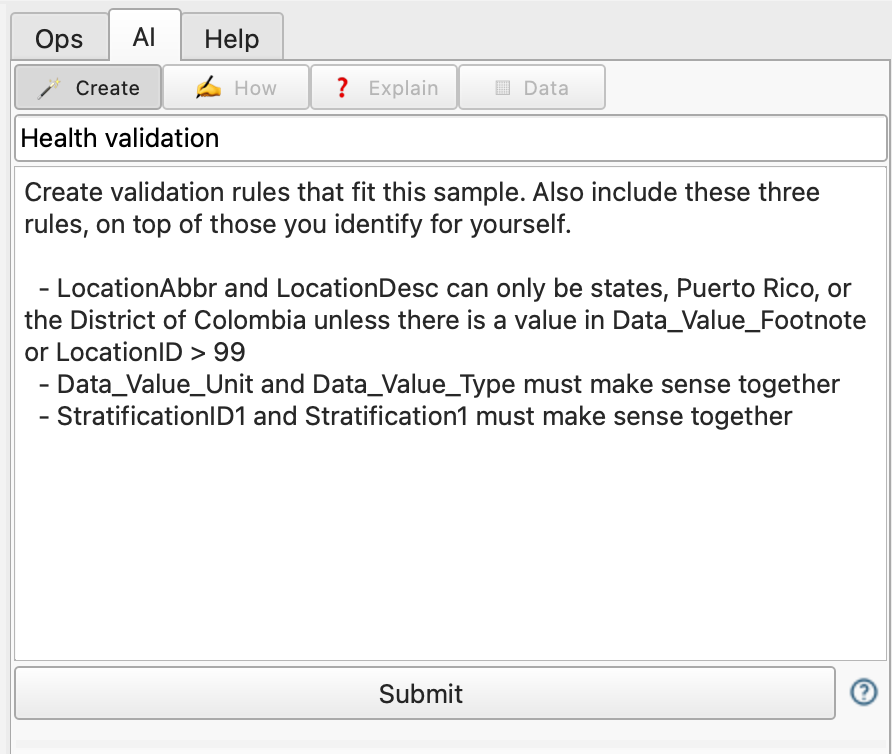
Createactivity - Enter a name and instructions:
    Create validation rules that fit this sample. Also include these three rules, on top of those you identify for yourself.
        - LocationAbbr and LocationDesc can only be states, Puerto Rico, or the District of Colombia unless there is a value in Data_Value_Footnote or LocationID is greater than 99
        - Data_Value_Unit and Data_Value_Type must make sense together
        - StratificationID1 and Stratification1 must make sense together


Since you may receive a sizable number of small csvpaths in response to your request, you may want to ask for comments to be included. Alternatively, you can request a breakdown or build-up explanation using the Explain activity.